TradingView Review: Which Plan Does a Crypto Trader Really Need
We ran a crypto watchlist through TradingView's free Basic plan, then upgraded through Essential and Plus to see exactly which indicator and alert limits a chart-reading trader hits first, and which plan actually removes them.
By The Hashmere Test Desk3 min read
8.4/108.4/10
Our verdict
TradingView's free Basic plan is genuinely usable for casual chart checking, but its 3 price alerts and single chart per tab push anyone tracking more than one or two coins toward the $12.95 Essential plan within a week. Plus and above matter only once you are running several indicators per chart at once.
Best for: Crypto traders who watch multiple coins and need more than 3 live price alerts
Basic plan is free forever with no card required and covers real crypto charting
Essential plan at $12.95 a month unlocks volume profile and 20 alerts, enough for most part-time traders
Crypto screener and per-symbol pages work identically on the free tier
Charts and alerts sync across web, desktop and mobile on every plan
What held it back
Free Basic plan allows only 1 chart per tab and 3 price alerts total
Server-side watchlist alerts, which fire even when the app is closed, need Premium or higher
Ultimate plan costs $199.95 a month, far beyond what most retail crypto traders need
Historical bar data is capped at 5,000 bars on Basic, thin for backtesting older setups
We signed up for a free TradingView account, set up a crypto watchlist with six coins and tried to run our normal chart routine on it before paying for anything. The plan structure is built to nudge you upward the moment your watchlist grows past a couple of coins, so we wanted to find exactly where that nudge turns into a real limit worth paying for.
What the free Basic plan actually lets you do
Basic costs nothing and needs no card, and it covers full crypto charting: candlesticks, drawing tools, the full symbol search and the crypto screener. The catch shows up fast. You get one chart per browser tab, two indicators stacked on that chart, and three price alerts total across your entire account (tradingview.com/pricing). Three alerts sounds fine until you realize that covers your whole watchlist, not one alert per coin, so tracking six coins with even a single alert each is already impossible on Basic.
We hit that wall on day two, when we tried to set price alerts on four different coins and got told to upgrade after the third. For someone who checks a chart occasionally, Basic is genuinely enough. For anyone running a real watchlist, it is a two or three day trial before the limits bite.
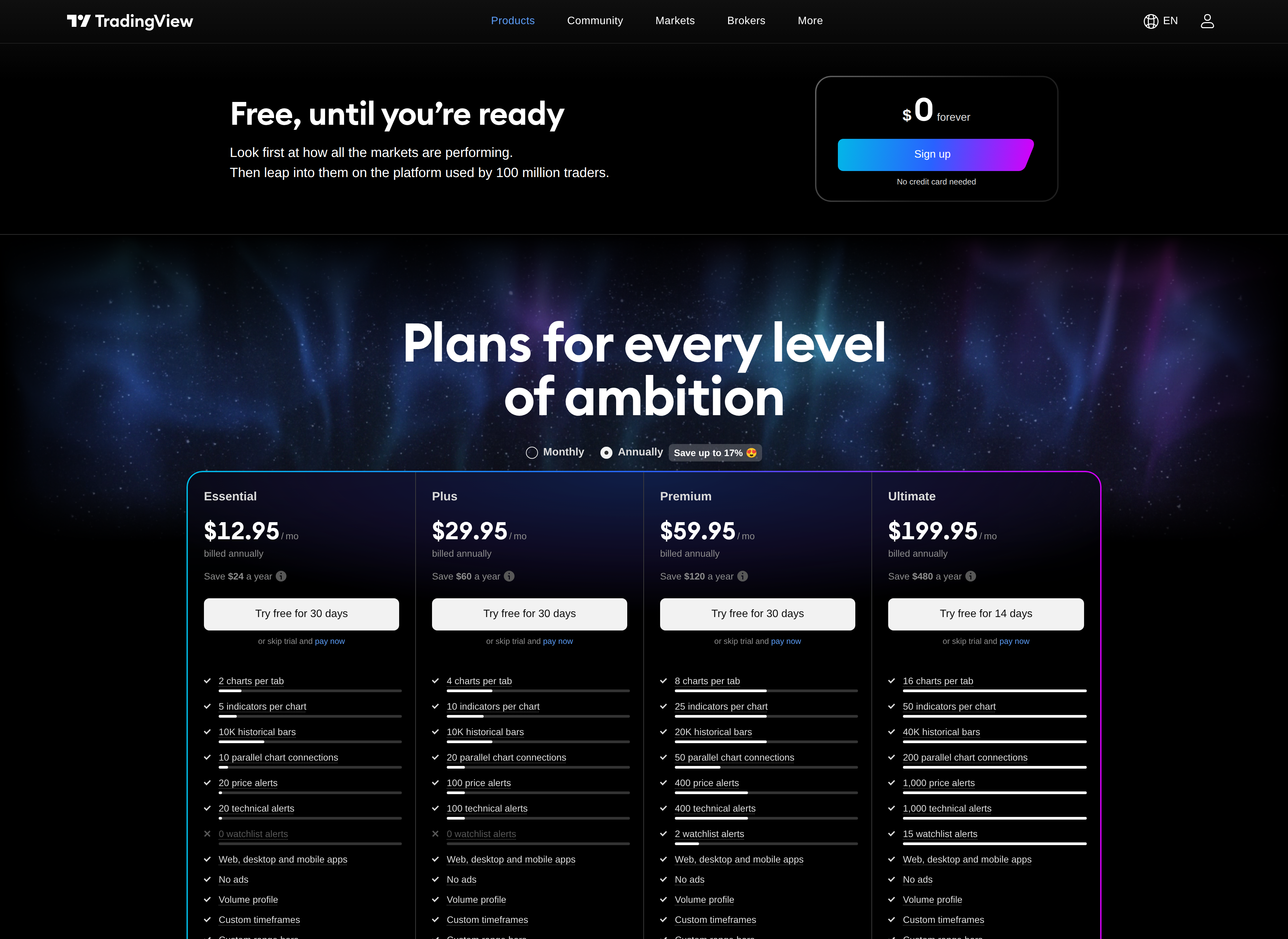
TradingView's pricing page, headlined Plans for every level of ambition
Essential at $12.95: the plan most crypto traders land on
Essential jumps the alert count to 20, doubles the indicators per chart to 5, and adds volume profile, a tool that shows how much trading happened at each price level rather than just over time. For a trader watching a handful of coins with a couple of indicators each, RSI plus a moving average say, 20 alerts and 5 indicators cover the job without friction. At $12.95 a month it is the plan we ended up settling on for the rest of this test, and based on the limits alone, we think it is where most part-time crypto traders belong too.
The step from Basic to Essential also unlocks a second chart per tab, which matters more than it sounds: comparing a coin against BTC dominance or against its own chain's gas price needs two charts open side by side, and Basic simply will not do that.
Plus, Premium and Ultimate: paying for scale, not features
Plus, at $29.95, bumps you to 4 charts, 10 indicators and 100 alerts, alongside volume footprint charting. Premium, at $59.95, goes to 8 charts, 25 indicators and 400 alerts, and is the first tier to add server-side watchlist alerts, meaning an alert can fire even when you have closed the app. Ultimate, at $199.95 a month, tops out at 16 charts, 50 indicators and 1,000 alerts.
Past Essential, what you are buying is scale rather than new capability: more charts open at once, more alerts running simultaneously, deeper historical bar data (5,000 bars on Basic versus up to 40,000 on Ultimate). Unless you are running a dozen strategies across a dozen charts at the same time, most of that ceiling will sit unused. We would only recommend Premium or Ultimate to someone running alerts as part of an actual trading desk, not a personal crypto watchlist.
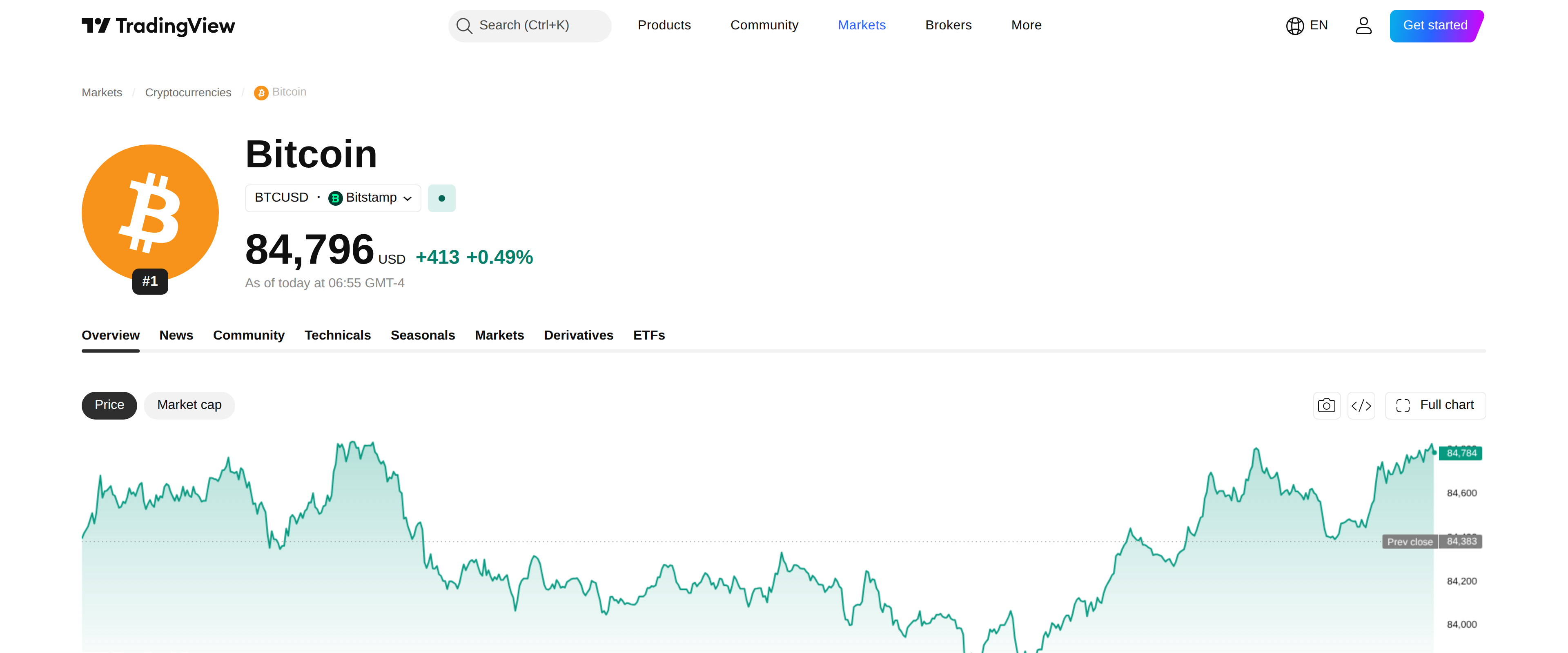
TradingView's free BTC/USD chart page
The crypto screener and chart pages don't gate behind a paywall
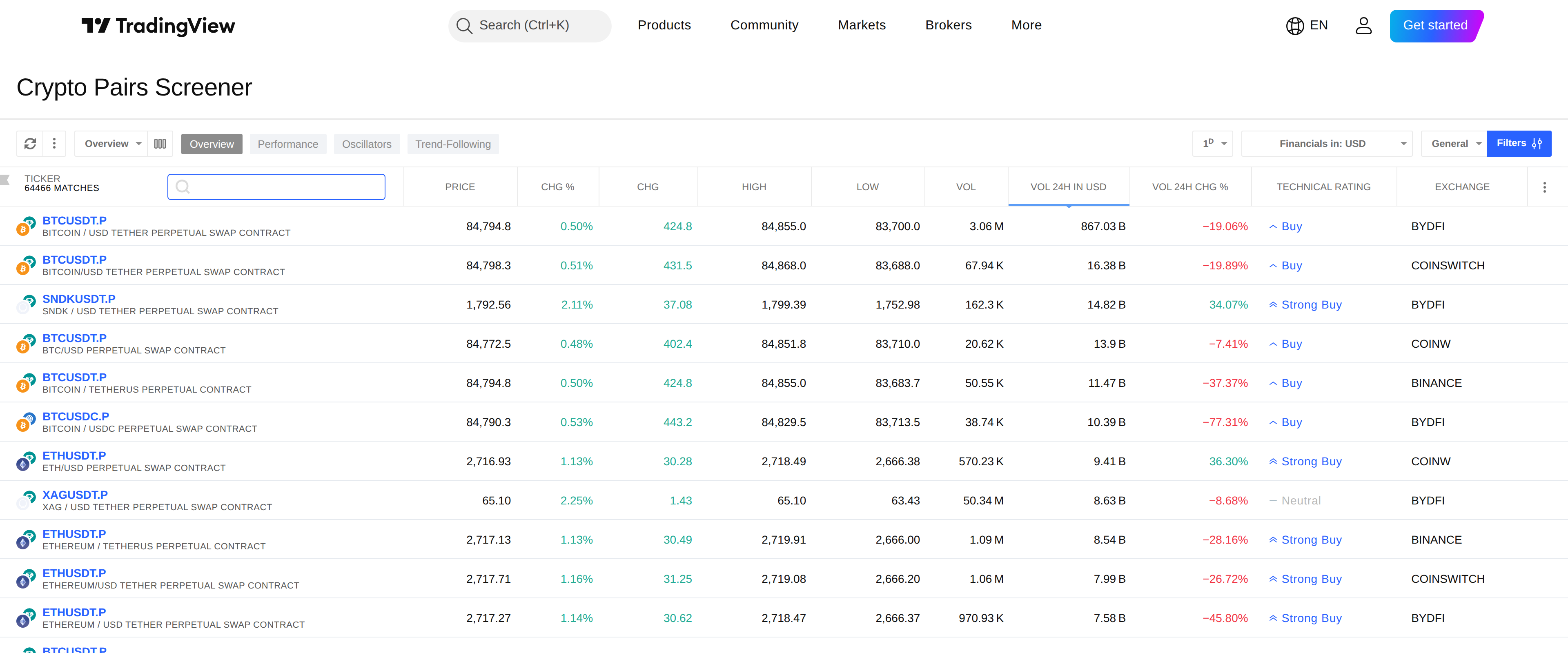
One thing that surprised us: the crypto pairs screener, which lists live prices, volume and basic technicals across thousands of pairs, is fully available on the free plan, as are individual symbol pages like the BTC/USD chart. If your main use of TradingView is scanning the market for setups rather than running live alerts on an open position, you may never need to pay at all, because the screening and charting tools that do that job are not behind the paywall.
TradingView's crypto pairs screener, listing live trading pairs
Which plan to pick
Start on Basic and actually try to break it before paying anything; a lot of casual chart-checking never needs more. The moment you want more than three live alerts or more than one chart open, move to Essential rather than skipping straight to a pricier tier, since the $12.95 plan covers what most retail crypto traders actually do. Save Plus and above for when you can point to a specific limit you have hit, not because a bigger number sounds better. None of this is trading advice; it is a description of what each TradingView plan lets you see, not what to do with it.